

Creating Scripts
Scripts attach behavior to entities through ScriptComponent. A script does not own
the entity. It receives the entity ID and scene pointer, then reads or changes the
components attached to that entity.
This page covers the full workflow from the Doriax editor through runtime initialization, export, and cleanup.
Mental model
Entity
  └── ScriptComponent
        └── scripts[]: ScriptEntry
              ├── type        (SUBCLASS | SCRIPT_CLASS | SCRIPT_LUA)
              ├── path        (.lua or .cpp)
              ├── headerPath  (.h for C++; empty for Lua)
              ├── className   (C++ class or Lua module name)
              ├── enabled
              ├── properties[] (inspector values)
              └── instance    (C++ pointer or Lua registry ref)
One ScriptComponent holds multiple script entries. Each entry is independent and
can be enabled or disabled separately.
Create a script in the editor
There are two ways to attach a script to an entity. Use New Script when you want the editor to generate the files for you; use Add Script when the files already exist and you only need a new entry pointing at them.
Flow A — New Script (generates the files)
- Select an entity in the Structure panel.
- Click New Script at the top of the Properties window (next to New component).
- Choose Lua Script, C++ Subclass, or C++ Script Class.
- Enter a class/module name and confirm.
The editor then does everything in one undoable step:
- writes template files into your project (header + source for C++, a single
.luamodule for Lua) with example properties and event registration already in place, - adds a
ScriptComponentto the entity if it does not have one, - appends an enabled script entry linked to the new files.
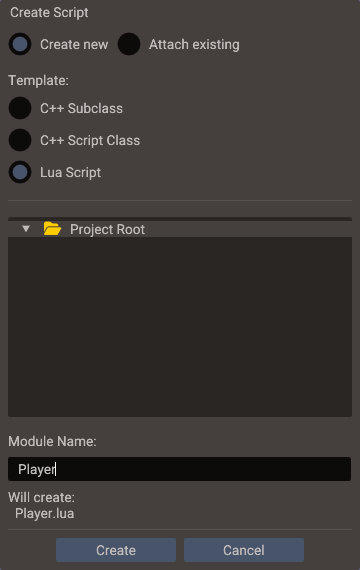
The same dialog's Attach existing option links a script that already exists: browse
to the .lua file (or the C++ header and source) and click Attach. The files are
not changed.
Flow B — Add Script (links existing files)
- Select the entity and add
ScriptComponentthrough New component (skip if it already has one). - In the ScriptComponent section, click Add Script. This creates an empty script entry — no files are written.
- Click the pencil button on the new entry to open Edit Script Details and set the
class name, then pick the Header File and Source File (or the
.luafile for Lua scripts) from your project.
Use this flow to reuse one script across many entities, or to wire up files you wrote outside the editor.
Managing script entries
Each entry in the ScriptComponent section has its own controls:
| Control | Action |
|---|---|
| Checkbox | Enable or disable the entry without removing it |
| Pencil button | Open Edit Script Details (class name, header, source); the × buttons clear a linked file |
| File buttons | Open the header or source in the integrated Code Editor |
| Right-click the entry header | Move Up, Move Down, or Remove the entry |
Entries run in list order, so use Move Up/Down when one script must initialize before another. All edits are undoable.
Script types
| Type | Enum value | Generated base | Best use |
|---|---|---|---|
| Lua Script | SCRIPT_LUA |
Lua table module | Fast iteration, UI glue, triggers, controllers |
| C++ Subclass | SUBCLASS |
The wrapper class matching the entity (Mesh, Camera, Terrain, Button, …) |
Behavior that calls wrapper methods like getPosition() |
| C++ Script Class | SCRIPT_CLASS |
ScriptBase |
Logic that accesses scene/entity explicitly without a wrapper |
How the editor picks a C++ subclass base
The editor inspects the selected entity's components and picks the most specific wrapper class for it — the same class it uses when you drag that entity into a header as an entity reference property. A few examples:
| Entity has | Default base class |
|---|---|
TerrainComponent |
Terrain |
ModelComponent |
Model |
WaterComponent |
Water |
MeshComponent (and none of the above) |
Mesh |
ButtonComponent |
Button |
CameraComponent |
Camera |
Body3DComponent |
Body3D |
Transform (and no recognized component) |
Object |
| None of the above | EntityHandle |
Not every base has a transform
Wrappers such as Body3D, Sound, and the action classes derive from EntityHandle
rather than Object, so they have no getPosition() / setPosition() and the
generated skeleton leaves the movement example out.
C++ Subclass vs. C++ Script Class
This is the most common source of confusion, so it's worth stating plainly. Both are C++
classes attached through a ScriptComponent. The only difference is what they inherit
from — and that changes how you reach the entity.
C++ Subclass — the script is the object.
The class inherits from the object wrapper that matches the entity (the table above shows
which one the editor picks). The script instance therefore is a Camera, Mesh,
Object, etc. for that entity, so you call wrapper methods directly on this — no wrapper
to construct:
// Subclass generated on a Camera entity
class FreeLook : public doriax::Camera {
    void onUpdate() {
        setPosition(getPosition() + offset);   // Object method, called on this
        setView(target);                        // Camera-specific method, called on this
    }
};
Yes — exactly as you'd expect: a subclass created on a Camera entity inherits from
Camera, and you get the Camera API for free. The wrapper hierarchy is:
So a Camera subclass also has every Object method (getPosition, setRotation, …)
and every EntityHandle method (getComponent, addComponent, getName, …). An
Object subclass has Object + EntityHandle methods; a bare EntityHandle subclass (an
entity with no Transform) has only the component-access methods.
C++ Script Class — the script references the object.
The class inherits from ScriptBase, which holds nothing but getScene() and
getEntity(). It implies no object type at all. To touch the entity you construct a
wrapper yourself:
class ScoreTracker : public doriax::ScriptBase {
    void onUpdate() {
        Object self(getScene(), getEntity());   // wrap the entity explicitly
        self.setPosition(...);
    }
};
| C++ Subclass | C++ Script Class | |
|---|---|---|
| Base class | Closest wrapper (Camera / Terrain / Mesh / Object / EntityHandle) |
ScriptBase |
| Reaching the entity | Call methods on this directly |
Construct a wrapper from getScene() / getEntity() |
| Implies an object type | Yes — matches the entity | No |
| Best when | The script's job is this entity | The script coordinates other entities or holds non-entity logic |
Neither is more powerful: a Script Class can do everything a Subclass can by constructing wrappers, and a Subclass can still reach other entities the same way. It is a design choice about ergonomics and intent — pick the base that matches what the script is about.
When to use each type
- Lua — Prototyping, gameplay that changes often, designers tuning values in the Properties, UI event handlers.
- C++ Subclass — Movement, animation control, or physics on the entity the script
lives on. You get
setPosition(),getBody2D(), camera/mesh/light methods, etc. directly onthis. - C++ Script Class — Managers, score trackers, spawners, or logic that touches many
entities through
getScene()andgetEntity().
Which should a player controller use?
A player controller almost always drives its own entity — reading input and moving
its transform — so a C++ Subclass is the natural fit. The editor bases it on
Object (or Mesh / Camera if the player entity has those components), so
getPosition()/setPosition() and the physics wrappers are available on this with
no boilerplate. Reach for a C++ Script Class only when the controller is really a
coordinator that mostly manipulates other entities.
Lua script format
A Lua script file must return a table. The table is the script prototype; Doriax creates a per-entity instance at runtime.
Minimal template
local PlayerController = {
    properties = {
        { name = "speed", displayName = "Speed", type = "float", default = 5.0 }
    }
}

function PlayerController:init()
    RegisterEngineEvent(self, "onUpdate")
end

function PlayerController:onUpdate()
    local object = Object(self.scene, self.entity)
    if Input.isKeyPressed(Input.KEY_RIGHT) then
        object.position = object.position + Vector3(self.speed * Engine.deltatime, 0, 0)
    end
end

return PlayerController
Required conventions
| Rule | Detail |
|---|---|
| Return a table | return MyScript at end of file |
| Properties table | Optional properties = { ... } for Properties fields |
init() |
Optional lifecycle hook called after properties are injected |
| Event methods | Name methods to match events (onUpdate, onClick, etc.) and register in init() |
self.scene |
Injected Scene* — use for systems and entity wrappers |
self.entity |
Injected entity ID |
Module loading
require("myscript") resolves through the virtual filesystem:
lua://lua/myscript.lualua://myscript.lua
ScriptComponent entries store the path relative to the
Lua directory and load it as
lua:// + path. Both lookups go through Data, so they still work when a native export
packs Lua sources into resources.pak.
A module that no entity runs, such as a utility table, is created from the Resources Browser with New → Lua Script — see Creating files and folders.
Referencing other entities
A script frequently needs to touch entities other than its own — a child model, a sibling UI element, a target the designer picks. There are three ways to get a handle, and choosing the right one (and the right constructor) avoids the most common scripting bug: accidentally creating a new entity instead of referencing an existing one.
1. Your own entity
self.entity is the entity the script is attached to. Wrap it with the two-argument
constructor for the object type you need:
2. An entity the designer picks (entity reference property)
Expose a typed property and drag the target entity onto it in the Properties window. The
engine resolves it to a ready-to-use handle (or the target's script instance) before
init() runs. This is the preferred way to wire up known relationships:
MyScript.properties = {
    { name = "target", type = "Object" },
}

function MyScript:init()
    if self.target then
        self.target.position = Vector3(0, 1, 0)
    end
end
See Script Properties for the supported reference types.
Declare the property by drag and drop
You don't have to write the property declaration by hand: drag the entity from the
Structure panel straight into the script open in the Code Editor — onto the
.lua file or the C++ header. The editor inserts a typed property declaration and
assigns the dropped entity as its value. See
Insert entity references by drag and drop.
3. An entity found by name
When a reference isn't wired up, look it up with
Scene:findEntity. It returns the
first entity with that name, or NULL_ENTITY if none. The two-argument form scopes the
search to children of a parent:
function MyScript:init()
    local childEntity = self.scene:findEntity("model", self.entity)
    if childEntity ~= NULL_ENTITY then
        self.model = Model(self.scene, childEntity)
    end
end
Wrap vs. create: the constructor that bites people
Every object handle has two constructors:
| Constructor | Effect | Owns the entity? |
|---|---|---|
Type(scene, entity) |
Wraps an existing entity | No |
Type(scene) |
Creates a brand-new entity | Yes |
Use the two-argument form whenever the entity already exists (your own entity, a found child, an editor-placed object). Reserve the one-argument form for genuinely spawning new objects at runtime.
Pitfalls to avoid
Type(scene)does not find anything — it always creates a new, empty entity. Using it to "get" a model placed in the editor silently produces a duplicate.- Don't create or load assets in
onUpdate. Loading a model (Model(scene)+loadGLTF) every frame churns entities and floods the log with errors. Do it once ininit(). - Keep handles to created entities alive. A one-argument handle owns its
entity; if you store it only in a local variable, the entity can be destroyed when
that handle is garbage-collected. Store runtime-spawned objects in
self. - Cache
findEntityresults. The lookup is linear over the entity list — resolve once ininit(), not every frame.
Lua runtime lifecycle
When a scene loads, and again whenever a bundle is spawned into it,
LuaBinding::initializeLuaScripts(scene) runs three passes over the scripts that have not
started yet:
Pass 1 — Create instances
For each enabled SCRIPT_LUA entry:
- Load and execute the Lua module with
require. - Verify the return value is a table.
- Create an instance table with the module table as
__index. - Set
__nameto the script class name. - Inject
sceneandentity. - Copy Properties property values onto the instance (
self.speed = 5.0, etc.). - Store a Lua registry reference in
ScriptEntry.instance.
Pass 2 — Resolve entity references
Pointer/entity properties (EntityReference) are resolved:
- If the target entity has a matching enabled Lua script, the reference becomes that Lua script instance.
- Otherwise Doriax pushes a typed wrapper (
Object,Mesh,Camera,EntityHandle, etc.) based onptrTypeName.
Pass 3 — Call init()
If the instance has an init function, Doriax calls self:init().
Register events inside init() so self and resolved references are ready.
Cleanup
LuaBinding::cleanupLuaScripts(scene) runs on scene unload, and
cleanupLuaScripts(scene, entity) for each entity destroyBundle removes:
- Remove all
FunctionSubscribecallbacks whose tag contains the script instance address (Engine::removeSubscriptionsByTagandScene::removeSubscriptionsByTag). luaL_unrefthe script instance.- Clear
ScriptEntry.instance.
C++ Subclass
A subclass script derives from the object wrapper that matches the entity and calls wrapper
methods directly on this — see
C++ Subclass vs. C++ Script Class for why.
Header (PlayerMover.h)
#pragma once

#include "Object.h"
#include "ScriptProperty.h"

class PlayerMover : public doriax::Object {
public:
    DPROPERTY("Speed")
    float speed = 5.0f;

    PlayerMover(doriax::Scene* scene, doriax::Entity entity);
    ~PlayerMover();

    void onUpdate();
};
Implementation (PlayerMover.cpp)
#include "PlayerMover.h"

using namespace doriax;

PlayerMover::PlayerMover(Scene* scene, Entity entity) : Object(scene, entity) {
    REGISTER_ENGINE_EVENT(onUpdate);
}

PlayerMover::~PlayerMover() {
    UNREGISTER_ENGINE_EVENT(onUpdate);
}

void PlayerMover::onUpdate() {
    Vector3 position = getPosition();
    if (Input::isKeyPressed(D_KEY_RIGHT)) {
        setPosition(position + Vector3(speed * Engine::getDeltatime(), 0, 0));
    }
}
The editor's Factory generates instantiation code when you export or build the project. Subclass scripts are compiled into the game binary.
C++ Script Class (ScriptBase)
Use a Script Class when you want a behavior class without implying any object wrapper. It
derives from ScriptBase — which exposes only getScene() and getEntity() — so you
reach the entity by constructing a wrapper explicitly.
#pragma once

#include "ScriptBase.h"
#include "ScriptProperty.h"

class ScoreTracker : public doriax::ScriptBase {
public:
    DPROPERTY("Score")
    int score = 0;

    ScoreTracker(doriax::Scene* scene, doriax::Entity entity);
    ~ScoreTracker();

    void onUpdate();
};
#include "ScoreTracker.h"

ScoreTracker::ScoreTracker(Scene* scene, Entity entity) : ScriptBase(scene, entity) {
    REGISTER_ENGINE_EVENT(onUpdate);
}

ScoreTracker::~ScoreTracker() {
    UNREGISTER_ENGINE_EVENT(onUpdate);
}

void ScoreTracker::onUpdate() {
    // getScene(), getEntity() available from ScriptBase
}
C++ script lifetime
A C++ script is constructed when its scene starts or when
createBundle spawns its bundle, and
deleted when the scene unloads or
destroyBundle removes the instance.
A script that destroys its own bundle is therefore deleted during that call: return right
after it without touching a member.
Property sync at runtime
Properties values are stored in ScriptEntry.properties. At play/export:
- C++ —
ScriptProperty::syncToMember()writes values into thememberPtrcaptured during editor parsing. - Lua — values are set as fields on the instance table before
init().
See Script Properties for the full type mapping.
Editor serialization and export
| Step | What happens |
|---|---|
| Scene save | ScriptComponent entries serialize to YAML with paths, types, and property values |
| Property parse | C++: ScriptParser reads DPROPERTY from headers. Lua: editor loads properties table |
| Play mode | Editor calls initializeLuaScripts on scene load and after each createBundle |
| Export | Generator emits C++ that registers scenes, creates C++ script instances, and calls initializeLuaScripts, for scenes and spawned bundles |
Common patterns
UI button handler (Lua)
local MenuButton = {}

function MenuButton:init()
    local button = Button(self.scene, self.entity)
    local ui = button:getUIComponent()
    RegisterEvent(self, ui.onClick, "onClick")
end

function MenuButton:onClick(x, y)
    print("clicked at", x, y)
end

return MenuButton
Physics contact (C++)
void Trap::onBeginContact(Body2D bodyA, unsigned long shapeA, Body2D bodyB, unsigned long shapeB) {
    // registered with REGISTER_EVENT(physics->beginContact2D, onBeginContact)
}
Referencing another entity (Lua)
local Follower = {
    properties = {
        { name = "target", displayName = "Target", type = "Object" }
    }
}

function Follower:init()
    RegisterEngineEvent(self, "onUpdate")
end

function Follower:onUpdate()
    if self.target then
        local obj = Object(self.scene, self.entity)
        obj.position = self.target.position
    end
end

return Follower
Troubleshooting
| Problem | Likely cause |
|---|---|
init() never runs |
Script entry disabled, wrong type, or Lua module does not return a table |
| Event handler not called | Forgot RegisterEngineEvent / REGISTER_ENGINE_EVENT in constructor or init() |
| Property not in Properties | DPROPERTY not immediately above member; unsupported type; header path wrong |
| Entity reference is nil | Target entity missing, wrong scene, or referenced script disabled |
| Duplicate event callbacks | Same tag registered twice; use UNREGISTER_* in destructor |
obj.position.y = v does not move the object |
Properties return a copy of the vector; assign the whole value, e.g. obj.position = Vector3(x, v, z) — see Math & Utilities |
| C++ build or CMake errors | Missing toolchain, or a leftover deleted script still listed in generated sources — see C++ Build Setup |
Next steps
- C++ Build Setup — compilers, CMake, and build troubleshooting
- Events — full event list, macros, and Lua registration
- Script Properties —
DPROPERTYand Luapropertiestables - Engine — runtime API
- API Index — all classes