

Script Properties
Script properties are designer-tunable values stored on each ScriptEntry and edited
in the Properties window. They serialize with the scene and sync into runtime script instances
on play and export.
Overview
| Source | Declaration | Parsed by |
|---|---|---|
| C++ subclass / ScriptBase | DPROPERTY macro before a member |
ScriptParser (editor) |
| Lua script | properties table in returned module |
ProjectUtils::loadLuaScriptProperties |
At runtime, ScriptProperty::syncToMember() (C++) or direct field injection (Lua)
applies Properties values before init() runs.
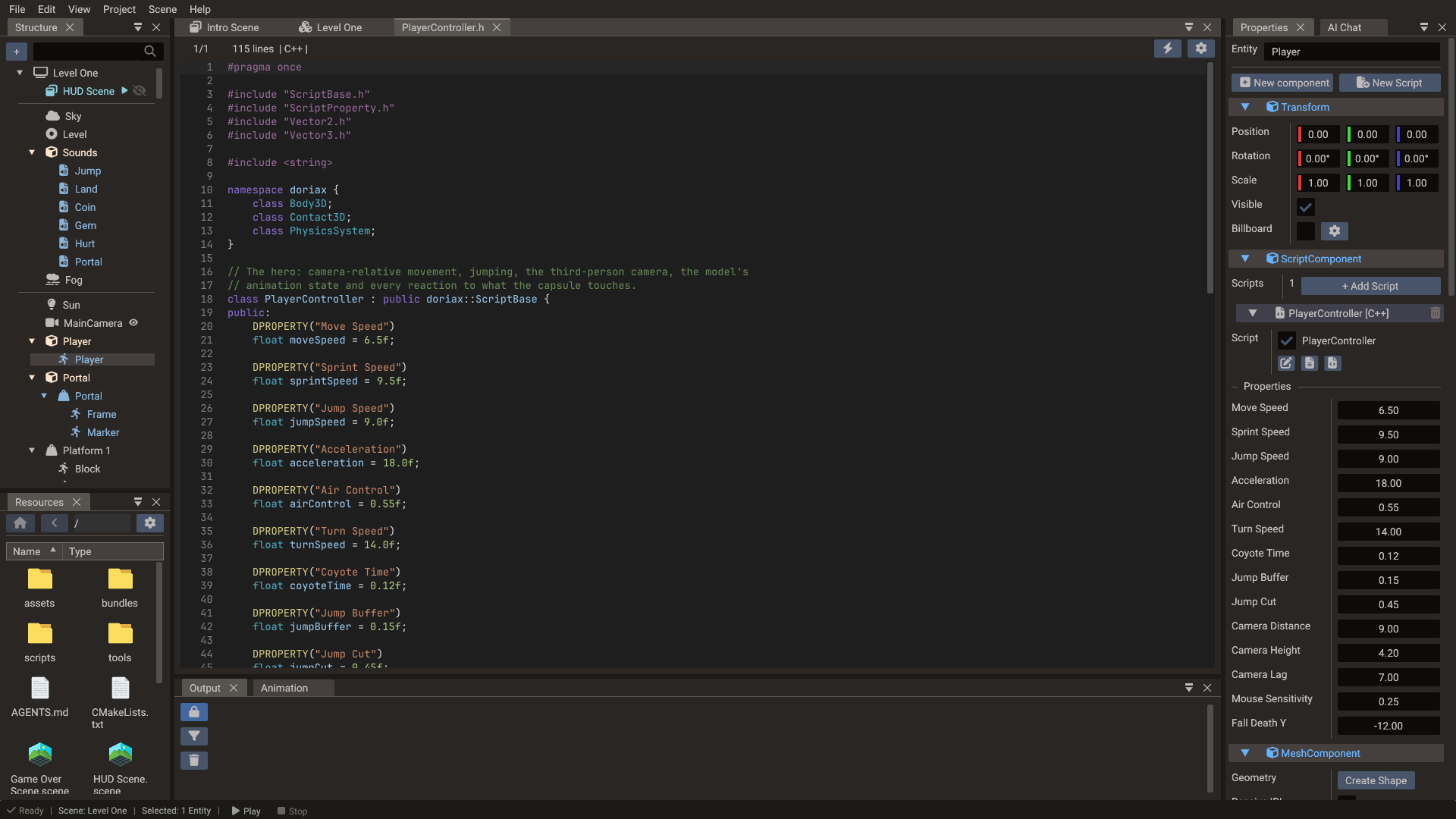
C++ DPROPERTY macro
Defined in engine/core/script/ScriptProperty.h:
#define DPROPERTY_1(DisplayName) public:
#define DPROPERTY_2(DisplayName, Type) public: /* @DPROPERTY_TYPE: Type */
#define DPROPERTY(...) GET_DPROPERTY_MACRO(__VA_ARGS__, DPROPERTY_2, DPROPERTY_1)(__VA_ARGS__)
The macro expands to public: plus an optional /* @DPROPERTY_TYPE: ... */ comment
for the editor parser. Place it immediately before the member variable — no other
declarations between the macro and the member.
Basic examples
DPROPERTY("Speed")
float speed = 5.0f;

DPROPERTY("Target Position")
doriax::Vector3 targetPosition = doriax::Vector3(0, 0, 0);

DPROPERTY("Mesh Color", Color4)
doriax::Vector4 meshColor = doriax::Vector4(1, 1, 1, 1);

DPROPERTY("Follow Target")
doriax::Object* followTarget = nullptr;
Syntax forms
| Form | Meaning |
|---|---|
DPROPERTY("Display Name") |
Infer editor type from the C++ member declaration |
DPROPERTY("Display Name", Color4) |
Force an explicit editor type hint |
DPROPERTY("Display Name") /* @DPROPERTY_TYPE: Color4 */ |
Equivalent annotation form |
The editor regex expects this pattern:
Type inference priority
- Explicit second argument:
DPROPERTY("X", Color4) - Comment annotation:
/* @DPROPERTY_TYPE: Color4 */ - C++ type inference (see table below)
Supported C++ property types
| C++ declaration | Editor type | Properties widget |
|---|---|---|
bool |
Bool | Checkbox |
int, int32_t, uint32_t, short, long |
Int | Integer field |
float, double |
Float | Float field |
std::string, string |
String | Text field |
Vector2, doriax::Vector2 |
Vector2 | X/Y fields |
Vector3, doriax::Vector3 |
Vector3 | X/Y/Z fields |
Vector4, doriax::Vector4 |
Vector4 | X/Y/Z/W fields |
Vector3 + Color/Color3 hint |
Color3 | RGB color picker |
Vector4 + Color/Color4 hint |
Color4 | RGBA color picker |
Pointer (Object*, Mesh*, Camera*, etc.) |
EntityReference | Entity picker |
Entity reference pointers
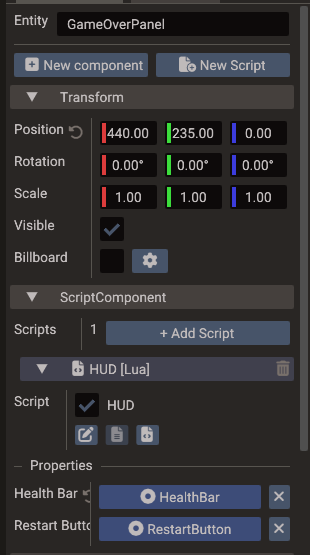
Pointer properties store an EntityReference { entity, sceneId } in serialized data,
not a raw C++ pointer. At runtime:
- C++ — resolved when the script instance is created.
- Lua — Pass 2 of
initializeLuaScriptsresolves to a Lua script instance (if the target has a matching enabled script) or a typed wrapper (Object,Mesh, etc.).
sceneId is 0 when the target is in the script's own scene. When you pick an entity
from a child scene shown inline in the Structure panel, sceneId holds that child
scene's ID instead, and the target is looked up through
SceneManager::getScenePtr.
That scene must already be built when the script starts, or the property stays
nil/nullptr. The editor's component fields, such as joint bodies, take same-scene
entities only (see Entity references).
Supported pointer types for entity references include all gameplay wrappers listed in
LuaBinding::pushEntityHandleByType (Object, Mesh, Camera, Light, Sprite, Body2D,
Action, etc.).
Supported default values
DPROPERTY("Enabled")
bool enabled = true;

DPROPERTY("Lives")
int lives = 3;

DPROPERTY("Speed")
float speed = 5.0f;

DPROPERTY("Name")
std::string name = "Player";

DPROPERTY("Offset")
doriax::Vector2 offset = doriax::Vector2(1, 2);

DPROPERTY("Target")
doriax::Vector3 target = doriax::Vector3(0, 3, 0);

DPROPERTY("Tint", Color4)
doriax::Vector4 tint = doriax::Vector4(1, 1, 1, 1);
Non-null pointer defaults are not supported. Use nullptr and assign the target in the
Properties.
A nullptr or NULL default on a member that is not a pointer is ignored: the property
starts at the type's default and the editor logs a warning.
Lua script properties
Declare properties in the table returned by your Lua module:
local Door = {
    properties = {
        { name = "openSpeed", displayName = "Open Speed", type = "float", default = 2.5 },
        { name = "startsOpen", displayName = "Starts Open", type = "bool", default = false },
        { name = "linkedDoor", displayName = "Linked Door", type = "Object" }
    }
}

function Door:init()
    print(self.openSpeed, self.startsOpen)
end

return Door
Lua property fields
| Field | Required | Purpose |
|---|---|---|
name |
Yes | Field name on self (e.g. self.openSpeed) |
displayName |
Yes | Label shown in Properties |
type |
Yes | Type string (see table below) |
default |
Recommended | Default value when first added |
Supported Lua type strings
Lua type value |
Stored ScriptPropertyType |
|---|---|
bool, boolean |
Bool |
int, integer |
Int |
float, number |
Float |
string |
String |
vector2, vec2 |
Vector2 |
vector3, vec3 |
Vector3 |
vector4, vec4 |
Vector4 |
color3 |
Color3 |
color4 |
Color4 |
entity, entitypointer, pointer |
EntityReference |
| Any other string | EntityReference with that string as desired wrapper/script type |
For entity references, the code editor picks the property type from the referenced
entity: it prefers an enabled Lua script class name when present, otherwise the wrapper
type detected from components (Object, Mesh, Camera, etc.).
Insert entity references by drag and drop
The fastest way to declare an entity reference property is to drag the entity from the Structure panel into the script file open in the Code Editor. This works for both Lua files and C++ headers, and does three things at once:
- Inserts the declaration at the right place — a new entry in the Lua
propertiestable, or aDPROPERTYline plus pointer member after the last existingDPROPERTYin the C++ header. - Picks the type from the dropped entity — the entity's script class name if it has
an enabled script of the matching language, otherwise the most specific wrapper type
detected from its components (
Mesh,Camera,Terrain,Button, etc.). In C++ the editor also adds the missing#include, whether the type is a script class or an engine one. - Assigns the value — every entity already using this script gets the dropped entity linked as the property value, so it shows up wired in the Properties window immediately.
The property name is derived from the entity name (camelCase), with a numeric suffix if the name is already taken.
Drop on the header, not the source
For C++ scripts the declaration belongs in the header. Dropping an entity onto a
.cpp file shows a reminder instead of inserting code.
Runtime sync
ScriptProperty (engine/core/script/ScriptProperty.cpp):
| Method | Direction |
|---|---|
syncToMember() |
Stored Properties value → C++ member or Lua instance field |
syncFromMember() |
C++ member or Lua field → stored value (editor refresh) |
C++ scripts store memberPtr during parsing. Lua scripts store luaRef to the instance
table field.
Properties behavior
- Editor parses script headers / Lua modules when a
ScriptEntryis added or the file changes. - New properties are appended; existing properties with the same name and type keep their edited values.
- Property edits go through undoable
PropertyCmdcommands. - Values serialize into scene YAML with the entity's
ScriptComponent.
The integrated code editor can insert DPROPERTY blocks (C++) or properties entries
(Lua) from templates.
ScriptPropertyType enum
enum class ScriptPropertyType {
    Bool, Int, Float, String,
    Vector2, Vector3, Vector4,
    Color3, Color4,
    EntityReference
};
Values are stored in a std::variant (ScriptPropertyValue).
Common mistakes
| Mistake | Fix |
|---|---|
Code between DPROPERTY and member |
Put the macro directly above the member |
| Function call as default | Use literals only (5.0f, "text", Vector3(...)) |
nullptr default on a non-pointer member |
Ignored with a warning, use a literal of the member's type |
Missing doriax:: prefix |
Add namespace or using namespace doriax in header |
| Expecting serialized C++ pointer | Entity references store {entity, sceneId} |
| Lua property name mismatch | name must match self.<name> used in code |
| Changed property type | Properties may reset value; rename if you need a fresh field |
Editor tooling reference
| File | Role |
|---|---|
editor/util/ScriptParser.cpp |
Parses DPROPERTY from C++ headers |
editor/util/ProjectUtils.cpp |
Loads Lua properties tables |
editor/window/CodeEditor.cpp |
Inserts property templates |
editor/window/dialog/ScriptCreateDialog.cpp |
New script wizard with examples |
editor/Catalog.cpp |
Maps ScriptPropertyType to Properties widgets |
Next steps
- Creating Scripts — attach scripts and understand lifecycle
- Events — react to input and gameplay with event handlers
- ScriptBase — C++ script base class