

Bundles
A bundle is a reusable entity hierarchy saved as a YAML .bundle file — Doriax's
prefab. Build an entity once (a configured enemy, a UI panel, a streetlight with light
and physics), turn it into a bundle, and instance it as many times as you need. Editing
the bundle updates every instance.
A .bundle file can live in any folder of your project directory, so you can
organize bundles alongside the assets they use (enemies/, ui/, props/, etc.).
Creating a bundle
- Build and configure the entity (and its children) in the scene.
- In the Resources Browser, navigate to the folder where the bundle should be saved.
- Either right-click the entity in the Structure panel and choose Save as Bundle, or drag the entity from the Structure panel and drop it on the Resources Browser.
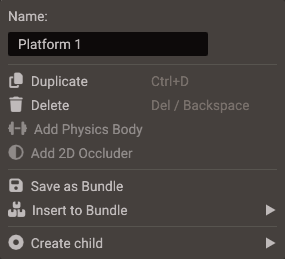
Both routes are the same operation, and both save into the folder the Resources Browser
is currently showing — the Save as Bundle tooltip names that folder so you can check
it before committing. The menu entry is disabled for locked entities and for entities
without a Transform.
The editor writes <EntityName>.bundle into the open folder (a numeric suffix is added
if the name is taken) and replaces the dragged hierarchy with an instance of the new
bundle — the entities now live in the bundle, and the scene holds an instance root
pointing at the file. Dragging a multi-entity selection works the same way and stores
all of the selected branches in one bundle. The whole operation is undoable.
The instance root takes the entity's position, rotation, and scale, so the bundle stores its content at the origin and each new instance starts at its own root. A multi-entity selection puts the root at the selection's center, where the move gizmo sits, with no rotation or scale. Anchored UI keeps its root at the origin, since its anchors already place it.
Values relative to the parent are not converted
As when an entity is moved under a new parent, values expressed relative to the saved entity's parent are not converted: a camera's Target when Use Target is on, and the transform values that actions, keyframe tracks, or scripts use on the entity itself. To keep them working, put that entity under an Empty object and save the parent as the bundle.
Instancing a bundle
Drag the .bundle file from the Resources Browser onto the Structure panel:
| Drop target | Result |
|---|---|
| Scene root node | Instance added at the top level of the scene |
An entity with Transform |
Instance added as a child of that entity |
Each drop creates an independent instance with its own root Transform, so instances
can be positioned, rotated, and scaled individually. Bundles can also be instanced
inside other bundles (nested bundles).
How instances stay in sync
The bundle owns the component data. All instances read from it, so:
- Editing a component inside any instance edits the bundle — the change appears in every instance of that bundle, in every scene that uses it.
- To customize a single instance, right-click the component header in the Properties window and choose Make Unique. That component becomes a local override for this instance and stops following the bundle.
- Revert to Bundle on an overridden component discards the local values and re-links it to the bundle.
In the Properties window, a component that still follows the bundle has a cube icon and a blue header; once it is made unique it is drawn like any other component.
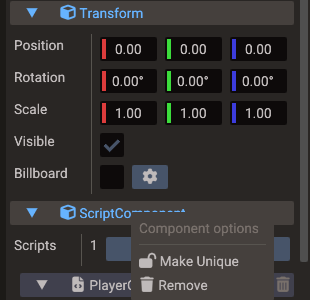
The instance root itself is not part of the bundle, so its components are always
per-instance. Its Transform is what lets you place each copy somewhere different, and
it cannot be removed. Any other component you add to the root, such as a script, stays
on that instance only and is saved in the scene, not in the .bundle file.
Models inside a bundle
A bundle shares a Model component's file and its Merge static model setting, not its nodes: each instance builds its own joints, parts, and animations from the file when the scene loads, so they are not stored in the scene. After Make Unique, loading another file into the Model creates the nodes in the editor, and those are saved with the scene like any other entities.
Revert to Bundle on a Model removes the instance's nodes and builds them again from the shared file. Entities you attached to the old nodes, such as a prop on a hand bone, move to the model entity and keep their place in the world, because anything under rebuilt nodes would not be saved. Undo puts them back on their nodes.
Model materials inside a bundle
Editing a submesh of an imported model stores the change on the member's Model
component, so it follows that component's shared or unique state: shared reaches every
instance and the .bundle file, Make Unique on the Model keeps it to one instance.
See 3D Graphics — Editing an imported model's submeshes.
References to entities outside the bundle
A component or script property on a bundle member can point at an entity that is
not part of the bundle (some other entity in the scene). That wiring is
per-instance: it is not stored in the .bundle file and does not propagate to
other instances — each instance in each scene keeps its own assignment, and a
freshly placed instance starts with the field set to None. References to
entities inside the bundle stay shared as usual, including clearing them.
Per-instance references are not yet persisted across scene reloads: unless the component is a local override (Make Unique), the field comes back as None when the scene is reopened and needs to be reassigned.
Adding and removing member entities
Right-click entities in the Structure panel to change what belongs to the bundle:
| Menu item | Where | Effect |
|---|---|---|
| Insert into bundle | A non-member child under a bundle instance | Entity becomes part of the bundle (appears in all instances) |
| Remove from bundle | A member entity inside an instance | Entity leaves the bundle but stays in this scene as a regular entity |
| Save as Bundle | Any entity outside a bundle | Saves the hierarchy as a new .bundle file and replaces it with an instance |
| Insert to Bundle ▸ | Any entity outside a bundle | Moves the entity into one of the scene's existing bundles |
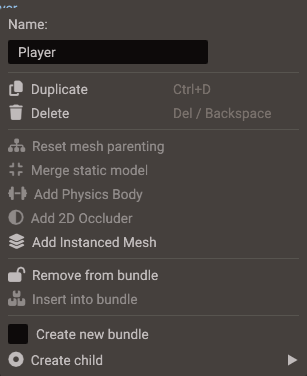
New entities created under a bundle root from the Structure create menu can join the bundle directly. Nested bundle instances have matching (nested) menu entries to control membership in the outer bundle.
Saving
Bundle edits mark the bundle as modified, and modified bundles are written to their
.bundle files when you save the scene (Ctrl+S). Unsaved bundle changes count
toward the scene's unsaved-changes indicator and the close-confirmation prompts, so
they are not lost silently.
Renaming or moving a .bundle file through the Resources Browser context menu updates
the scenes that reference it.
Bundles in the build
Only the bundles the project uses are compiled into the game and registered with BundleManager:
- every bundle instantiated in a scene, and
- every bundle listed in Project → Bundles.
A bundle that no scene instantiates — one that exists only to be spawned from a script —
has to be listed, or createBundle reports bundle 'name' not found at runtime. Listing
it also compiles the C++ scripts on its entities: each spawned instance runs its scripts,
Lua and C++, the same way a scene does (see
createBundle).
Project → Bundles lists every .bundle file in the project. The ones a scene
instantiates are checked and disabled, with the scenes using them in the Used by
column; check any other bundle to build and register it as well. The list is stored as
standaloneBundles in project.yaml, follows the file when it is renamed or moved, and
drops entries whose file is deleted.
In the Resources Browser, a .bundle the project does not build is drawn dimmed, and so
is a .scene file that is not part of the project.
Instances in an exported build
An exported scene creates each placed instance through the bundle's generated factory,
the same one BundleManager registers. Member entities get their ids when that factory
runs, so the id a member has in the editor is not the id it has in a build, and
generated code never hardcodes one: whenever the scene needs a member — a Make
Unique override, a non-member child kept under a member, or a component or script
property on a scene entity that points into the instance — it takes the entities the
factory created and addresses them by position. Overrides and references into instances
therefore behave in a build exactly as they do in the editor, nested bundles included.
Scripts should reach an instance's entities by name under its root with
findEntity(name, root), never by
an id copied from the editor.
Bundles vs child scenes
| Bundle | Child scene | |
|---|---|---|
| File | .bundle |
.scene |
| Use for | Repeated entity hierarchies (props, enemies, UI widgets) | Large scene sections, levels, screens |
| Instances per scene | Many | One reference per child scene node |
| Per-instance overrides | Yes (Make Unique per component) | No |
See also
- Structure Panel — the tree where bundles are created and instanced
- Resources Browser — where
.bundlefiles live - Properties & Components — component editing and override menus